Guests may arrive ready to explore the mountains, but one of their first questions will probably be, “What is the Wi-Fi password?”
A printed Wi-Fi sign gives guests the information they need without making them search through old messages, contact the host, or inspect the back of the router. It is a simple addition that can make a mountain cabin, lake house, vacation rental, guest room, or Airbnb feel more organized and welcoming.
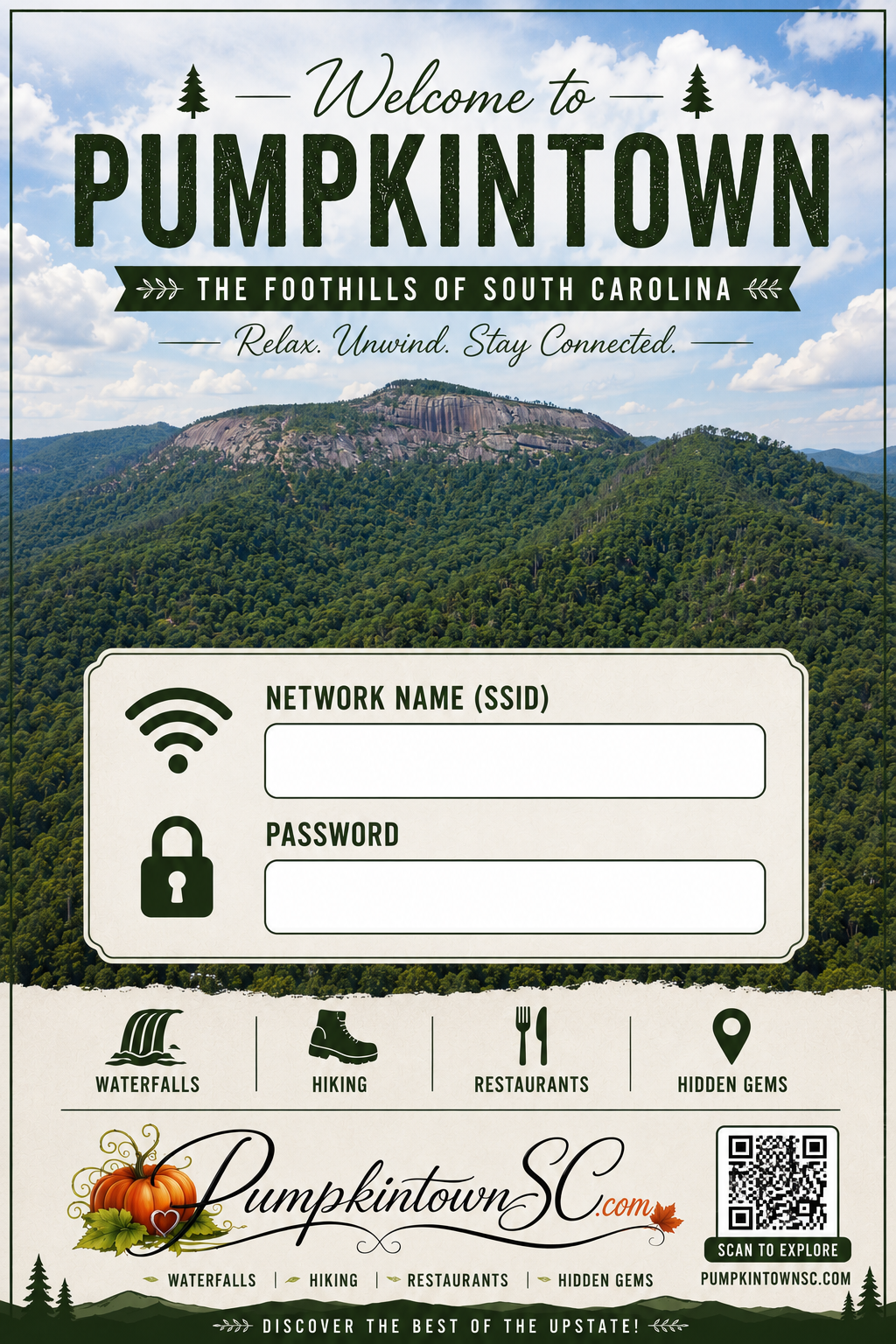
We created a free printable guest Wi-Fi sign inspired by Table Rock and the South Carolina foothills. It provides space for your network name and password while adding a local touch to your guest welcome area.

Download the Free Printable Wi-Fi Sign
Download the high-resolution Wi-Fi sign.
The design includes:
- A large Guest Wi-Fi heading
- Space for the network name
- Space for the password
- A Table Rock inspired background
- Rustic colors suited to cabins and mountain homes
- A QR code directing guests to PumpkintownSC.com
- Room to add information by hand or digitally
The included QR code directs guests to PumpkintownSC.com so they can find local attractions, restaurants, hiking trails, scenic drives, and other visitor information. It does not automatically connect a device to your Wi-Fi network.
Who Can Use This Printable?
The sign was designed for Upstate properties, but anyone can download and use it.
It works well in:
- Mountain cabins
- Airbnb properties
- Vacation rentals
- Lake houses
- Guest bedrooms
- Bed and breakfasts
- Campground offices
- Churches
- Waiting rooms
- Home offices
- Reception areas
- Family homes with frequent visitors
Hosts can place the sign in a frame and update the information whenever the network or password changes.
Why Vacation Rentals Need a Wi-Fi Sign
Reliable instructions matter most in mountain rentals because cellular service may be weak or unavailable.
Guests may need Wi-Fi to:
- Contact the property owner
- Review check-in instructions
- Download maps
- Check park conditions
- Find restaurants
- Monitor mountain weather
- Look up emergency information
- Communicate with family
- Plan the next day’s activities
- Complete work or school responsibilities
A clearly displayed sign helps guests connect without needing cellular service to retrieve the password from an email or booking platform.
This can be particularly useful around Table Rock, Pumpkintown, Lake Jocassee, Sassafras Mountain, and other parts of the Upstate where mobile coverage can vary.
How to Use the Printable Wi-Fi Sign
Step 1: Download the Design
Open the full-resolution printable and save it to your computer or phone.
Use the full-resolution file, not a screenshot. A screenshot may appear blurry or pixelated when printed.
Step 2: Add Your Network Information
Add the following information:
Network name: The Wi-Fi network guests should select.
Password: The password guests should enter exactly as written.
You can write the information by hand after printing or add it digitally before printing.
Make sure you distinguish between:
- Uppercase and lowercase letters
- The number zero and the letter O
- The number one and a lowercase L
- Spaces, symbols, and punctuation
Test the information with a device that has not previously connected to the network. This confirms that a new guest can follow the instructions.
Step 3: Print the Sign
The design works well on:
- White cardstock
- Matte photo paper
- Premium presentation paper
- Standard printer paper placed inside a frame
Use your printer’s high-quality setting for the clearest text and image.
If your printer offers a scaling option, select “fit to page” or confirm that none of the design is cut off.
Step 4: Place It in a Frame
A simple frame protects the sign and makes it look like part of the room, not a temporary instruction sheet.
A frame with a glass or clear plastic surface also allows you to write the network information with a dry-erase marker. When the password changes, wipe the surface clean and write the new information without reprinting the design.
Step 5: Put It Where Guests Will See It
Good locations include:
- The entryway table
- A kitchen counter
- The coffee station
- The living room
- A guest bedroom
- The welcome-book area
- A home office
- The television stand
- The check-in desk
- A dedicated charging station
Avoid displaying the password where it can be easily seen through a window or photographed from outside the property.
Use a Separate Guest Network
If your router allows it, create a guest network rather than sharing the password for your primary household network.
A separate guest network can help keep visitors’ devices apart from personal computers, printers, security equipment, smart-home devices, and other connected systems.
Choose a network name guests can recognize, such as:
- TableRockGuest
- CabinGuestWiFi
- LakeHouseGuests
- MountainRetreat
- WelcomeToPumpkintown
Avoid including personal names, the full property address, or information that reveals which devices are connected to the network.
Use a strong password that guests can enter easily. Update the sign whenever the password changes.
Create a Complete Guest Welcome Station
The Wi-Fi sign becomes more useful when it is displayed with the other information guests need during their stay.
A guest welcome station might include:
- Wi-Fi network and password
- Host contact information
- Check-out time
- Parking instructions
- Emergency contact information
- Trash and recycling instructions
- Thermostat directions
- Fireplace or firepit rules
- Pet policies
- Trail and lake safety reminders
- Restaurant recommendations
- A printed local map
- A list of nearby gas stations and pharmacies
Place urgent property information in writing instead of requiring guests to scan a QR code. Phones can lose power, cellular coverage may fail, and guests may not have internet access when they first arrive.
Help Guests Plan Their Visit
The QR code on the printable directs visitors to PumpkintownSC.com, where they can learn more about the region.
Hosts can also include links to a few carefully selected local guides in a digital welcome message.
Start With the Pumpkintown Visitor Guide
The complete Pumpkintown visitor guide introduces guests to the community, nearby attractions, restaurants, outdoor recreation, and local history.
It is the best general link for visitors who have never explored the area.
Share Nearby Attractions
The guide to 25 things to do within 25 miles of Pumpkintown helps guests quickly find activities within driving distance.
For travelers watching their vacation budget, share 15 free outdoor adventures in Pickens County and the Upstate foothills.
Help Guests Explore Table Rock
Guests planning a state park visit should begin with Why Table Rock Should Be at the Top of Your South Carolina Bucket List.
Hikers can use the Table Rock State Park Trail Guide to compare routes and difficulty.
Families looking for a shorter hike may prefer Carrick Creek Trail.
Recommend Waterfalls
Wildcat Wayside Falls is one of the easiest waterfalls to include in a Highway 11 trip.
More experienced hikers may want to read the complete guide to Rainbow Falls.
Remind guests that waterfall rocks can be extremely slippery and that swimming or climbing may be prohibited.
Suggest a Scenic Drive
The complete guide to South Carolina Highway 11 helps guests plan a drive through the foothills.
Possible stops include Table Rock, Pumpkintown, roadside waterfalls, overlooks, historic bridges, local restaurants, and small shops.
Point Guests Toward Local Restaurants
The guide to local restaurants and places to eat gives visitors a starting point for finding food around the Upstate.
Nearby choices covered by PumpkintownSC include:
- Pumpkintown General Store and Café
- Aunt Sue’s Country Corner
- Pumpkintown Mountain Opry
- Holly Springs Country Store
Restaurant hours can change, especially during holidays and slower seasons. Encourage guests to confirm hours before driving.
Share Local History
Visitors interested in the stories behind the community can read The History of Pumpkintown and How Pumpkintown Got Its Name.
The Hagood Mill visitor guide introduces guests to one of Pickens County’s most important historic sites.
Help Guests Find Seasonal Events
Direct visitors to the Upstate events and festivals guide for current community celebrations, concerts, markets, and seasonal activities.
Event dates and admission details can change, so guests should verify information with the event organizer before leaving.
Reveal Local Hidden Gems
Visitors who want to travel beyond the best-known attractions can explore Pumpkintown’s hidden gems and the South Carolina foothills.
This provides hosts with an easy way to recommend places guests may not find through a basic internet search.
Make Your Cabin More Guest-Friendly
A Wi-Fi sign is only one small part of preparing a cabin or vacation rental.
Our guide to making a Table Rock cabin cozy, practical, and guest-ready includes ideas for organizing spaces, improving comfort, and creating a stronger sense of place.
Cabin owners may also enjoy the guide to rustic cabin decorating ideas inspired by Pumpkintown.
A successful guest space does not need expensive decorations. Clear information, clean rooms, comfortable furniture, dependable lighting, and thoughtful local recommendations often matter more.
Wi-Fi Sign Tips for Vacation Rental Hosts
Before every new reservation:
- Confirm that the displayed network name is correct.
- Test the password with a device that has not connected before.
- Make sure the router is working.
- Check that the sign is easy to find.
- Remove outdated instructions.
- Confirm that the host contact information is current.
- Restart the router if the connection has become unreliable.
- Provide basic troubleshooting directions.
- Update the sign whenever the password changes.
If the property experiences frequent outages, explain what guests should do and whom they should contact. Do not ask guests to reset networking equipment unless you provide clear instructions.
Frequently Asked Questions
Is the printable Wi-Fi sign free?
Yes. You can download and print the design for use in your home, guest room, cabin, or vacation rental.
Can I use it in an Airbnb or VRBO property?
Yes. The sign was designed for vacation rentals and mountain cabins.
Does the QR code connect guests to Wi-Fi?
No. The QR code on this version directs guests to PumpkintownSC.com for local visitor information. Guests must enter the network name and password displayed on the sign.
Can I add my information digitally?
Yes. You can add the network name and password with an image-editing, presentation, or design program before printing.
You can also print the sign and write the information by hand.
What paper should I use?
White cardstock or matte photo paper usually produces the best results. Standard printer paper also works when placed inside a frame.
What size frame should I use?
Choose the print size that best fits your printer and display area. Review the print preview before printing to make sure the design fits the selected page and frame.
Should I display my regular Wi-Fi password?
Use a separate guest network if your router supports one. This keeps guests from accessing the primary network used by personal and smart-home devices.
Where should I place the sign?
Place it near the entryway, welcome book, coffee station, television, or another location guests will naturally check after arriving.
Download Your Free Guest Wi-Fi Sign
A printed Wi-Fi sign solves a simple but common problem for hosts and homeowners. It gives guests immediate access to the network while adding a small piece of Upstate character to the room.
Download the free high-resolution guest Wi-Fi sign, add your network information, place it in a frame, and display it where visitors can easily find it.
Once guests are connected, encourage them to begin exploring with the complete Pumpkintown visitor guide.